Previously, I used the Switchbot-hub adapter to integrate my switchbot devices into iobroker, which worked well at first, but later the following problem appeared, the data points of the connected devices were not updated.
To solve this problem, I created a python script that retrieves switchbot device data using the Switchbot Utilities Switchbot API, and then forwards it to the MQTT server using Paho mqtt.

Smart Remote – IR Blaster, Link SwitchBot to Wi-Fi (Support 2.4GHz), Control TV, Air Conditioner, Compatible with Alexa, Google Home, IFTTT

Work as a WiFi Thermometer Hygrometer, IR Remote Control, Smart Remote and Light Sensor, Link SwitchBot to Wi-Fi (Support 2.4GHz), Compatible with Alexa&Google Assistant
advertising
This project runs on the Ubuntu 22.04 operating system that hosts the iobroker server. Let’s see the details.
First, let’s update the package list:
sudo apt-get updateLet’s check if Python3 is installed on our machine. Enter in the command line:
python3 --versionIf it returns the version number, Python3 is installed, if we get an error “bash: python3: command not found”, Python3 is not installed.
sudo apt-get install python3If you don’t already have pip installed, install it too.
sudo apt-get install python3-pipLet’s make a folder named switchbot for the project.
mkdir switchbotThen navigate to the newly created switchbot folder.
cd switchbotHere we will create a virtual environment.
python3 -m venv venvThen we activate the virtual environment.
source venv/bin/activateThen install the necessary libraries.
Switchbot Utility the Switchbot API.
python3 -m pip install switchbot-utilityPaho-mqtt client.
python3 -m pip install paho-mqtt
SwitchBot Smart Switch Button Pusher
Fingerbot for Automatic Light Switch, Timer and APP Bluetooth Remote Control, Works with Alexa, Google Home, IFTTT When Paired with SwitchBot Hub…
advertising
Let’s create the Python script named switchbot-client.py.
nano switchbot-client.pyContents of the switchbot-client.py file.
#!/usr/bin/python3
import time
import subprocess
import json
from paho.mqtt import client as mqtt_client
from switchbot_utility.switchbot import Switchbot
from switchbot_utility.switchbot_meter import SwitchbotMeter
from switchbot_utility.battery_mixin import BatteryMixin
from switchbot_utility.switchbot_ir_air_conditioner import IrAirConditioner
from switchbot_utility.switchbot_ir_others import IrOthers


delay = 1   # sec

broker = '192.168.1.20'
port = 1883
username = ''
password = ''
client_id = 'SwitchbotPyClient'

apiCallsTopic = 'Switchbot/Settings/APIcalls'
discoverTopic = 'Switchbot/Settings/Discover'

tempSensorList = []
IrAirConditionerList = []
IrOthersList = []
IrAirConditionerTopicList = []
IrOthersTopicList = []


def connect_mqtt():
    def on_connect(client, userdata, flags, rc):
        if rc == 0:
            print("Connected to ioBroker!")
        else:
            print("Failed to connect, return code %d\n", rc)

    client = mqtt_client.Client(mqtt_client.CallbackAPIVersion.VERSION1, client_id)
    client.username_pw_set(username, password)
    client.on_connect = on_connect
    client.connect(broker, port)
    return client


def publish(client, topic, payload):
    result = client.publish(topic, payload)
    status = result[0]
    if status == 0:
        print(f"Send `{payload}` to topic `{topic}`")
    else:
        print(f"Failed to send message to topic {topic}")


def on_message(client, userdata, message):
    global apiCalls
    global discover

    message_payload = str(message.payload.decode("utf-8"))
    message_topic = message.topic

    if message_topic == apiCallsTopic:
        apiCalls = message_payload
        print("apiCalls: ", message_payload)

    if message_topic == discoverTopic:
        discover = message_payload
        print("discover: " , message_payload)


    a = 0
    while a < len(IrAirConditionerTopicList):
        if message_topic == IrAirConditionerTopicList[a]:
            print(message_topic + ": " + message_payload)

            message_json = json.loads(message_payload)

            temp = (message_json["temperature"])
            mode = (message_json["mode"])
            fan = (message_json["fan_speed"])
            power = (message_json["power_state"])

            klimaDeviceId = message_topic.replace("Switchbot/Devices/","")
            klimaDeviceId = klimaDeviceId.replace("/Command","")
            klima = IrAirConditioner(klimaDeviceId)
            klima.set_all(temp, mode, fan, power)
        a += 1


    a = 0
    while a < len(IrOthersTopicList):
        if message_topic == IrOthersTopicList[a]:
            print(message_topic + ": " + message_payload)
            otherDeviceId = message_topic.replace("Switchbot/Devices/","")
            otherDeviceId = otherDeviceId.replace("/Command","")
            otherDevice = IrOthers(otherDeviceId)
            otherDevice.customize(message_payload)

            publish(client,"Switchbot/Devices/" + otherDeviceId + "/Command", "null")

        a += 1
    a = 0


def run():
    global apiCalls
    global discover

    switchbot = Switchbot()
    switchbot.devicelist()

    client = connect_mqtt()
    client.on_message = on_message
    client.loop_start()

    client.subscribe('Switchbot/Settings/APIcalls')
    client.subscribe('Switchbot/Settings/Discover')

    f = open("deviceList.txt", "r")
    for x in f:
        devicesList = x.rsplit(", ")
        if devicesList[2] == "WoIOSensor":
            tempSensorList.append(devicesList[0])           # WoIOSensors ID list
        elif devicesList[2] == "Air Conditioner":
            IrAirConditionerList.append(devicesList[0])
        elif devicesList[2] == "Others":                    # Others
            IrOthersList.append(devicesList[0])

        publish(client,"Switchbot/Devices/" + devicesList[0] + "/Name", devicesList[1])
        time.sleep(delay)
        publish(client,"Switchbot/Devices/" + devicesList[0] + "/Type", devicesList[2])
        time.sleep(delay)
    f.close()

    IrAirConditionerIndex = 0
    while IrAirConditionerIndex < len(IrAirConditionerList):
        client.subscribe("Switchbot/Devices/" + IrAirConditionerList[IrAirConditionerIndex] + "/Command")
        IrAirConditionerTopicList.append("Switchbot/Devices/" + IrAirConditionerList[IrAirConditionerIndex] + "/Command")
        IrAirConditionerIndex += 1

    IrOthersIndex = 0
    while IrOthersIndex < len(IrOthersList):
        client.subscribe("Switchbot/Devices/" + IrOthersList[IrOthersIndex] + "/Command")
        IrOthersTopicList.append("Switchbot/Devices/" + IrOthersList[IrOthersIndex] + "/Command")
        IrOthersIndex += 1

    i = int(apiCalls)

    while(1):
        if(discover == "true"):
            f = open("deviceList.txt", "r")
            for x in f:
                devicesList = x.rsplit(", ")
                if devicesList[2] == "WoIOSensor":
                    tempSensorList.append(devicesList[0])           # WoIOSensors ID list
                elif devicesList[2] == "Air Conditioner":
                    IrAirConditionerList.append(devicesList[0])
                elif devicesList[2] == "Others":                    # Others
                    IrOthersList.append(devicesList[0])

                publish(client,"Switchbot/Devices/" + devicesList[0] + "/Name", devicesList[1])
                time.sleep(delay)
                publish(client,"Switchbot/Devices/" + devicesList[0] + "/Type", devicesList[2])
                time.sleep(delay)
            f.close()

            IrAirConditionerIndex = 0
            while IrAirConditionerIndex < len(IrAirConditionerList):
                client.subscribe("Switchbot/Devices/" + IrAirConditionerList[IrAirConditionerIndex] + "/Command")
                IrAirConditionerTopicList.append("Switchbot/Devices/" + IrAirConditionerList[IrAirConditionerIndex] + "/Command")
                IrAirConditionerIndex += 1

            IrOthersIndex = 0
            while IrOthersIndex < len(IrOthersList):
                client.subscribe("Switchbot/Devices/" + IrOthersList[IrOthersIndex] + "/Command")
                IrOthersTopicList.append("Switchbot/Devices/" + IrOthersList[IrOthersIndex] + "/Command")
                IrOthersIndex += 1

            discover = "false"
            publish(client, "Switchbot/Settings/Discover", "false")
            time.sleep(delay)

        i += 1
        time.sleep(delay)

        if i > int(apiCalls):
            i = 0
            tempSensorIndex = 0
            while tempSensorIndex < len(tempSensorList):
                meter = SwitchbotMeter(tempSensorList[tempSensorIndex])

                publish(client,"Switchbot/Devices/" + tempSensorList[tempSensorIndex] + "/Temperature", meter.get_temperature())
                time.sleep(delay)

                publish(client,"Switchbot/Devices/" + tempSensorList[tempSensorIndex] + "/Humidity", meter.get_humidity())
                time.sleep(delay)

                publish(client,"Switchbot/Devices/" + tempSensorList[tempSensorIndex] + "/Battery", meter.get_battery())
                time.sleep(delay)
                tempSensorIndex += 1

    client.loop_stop()


if __name__ == '__main__':
    run()
Let’s create the settings.json file.
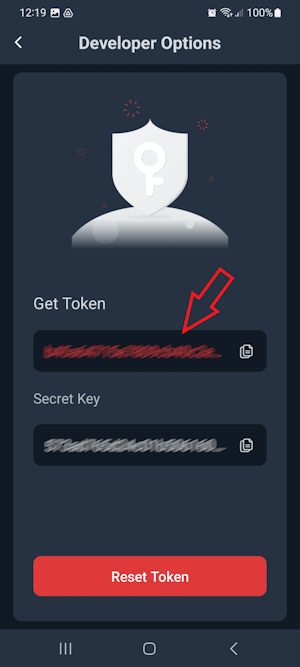
nano settings.jsonWe store ‘token’ and ‘secret key’ keys in the settings.json file, which can be obtained from the SwitchBot Application.
{
    "token": "b43a******************************************************************9a0",
    "secret": "840***********************1d2c86"
}
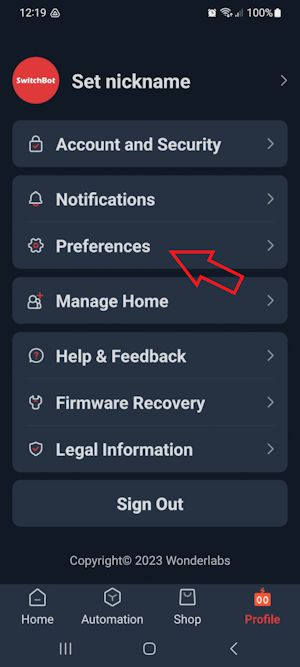
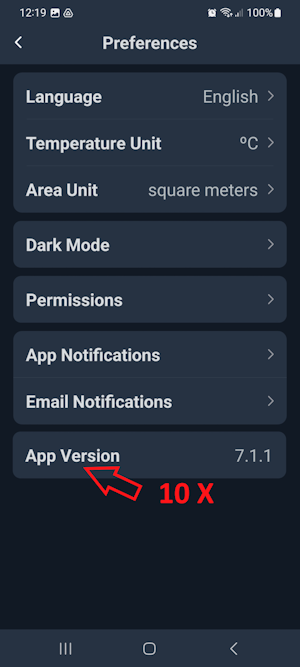
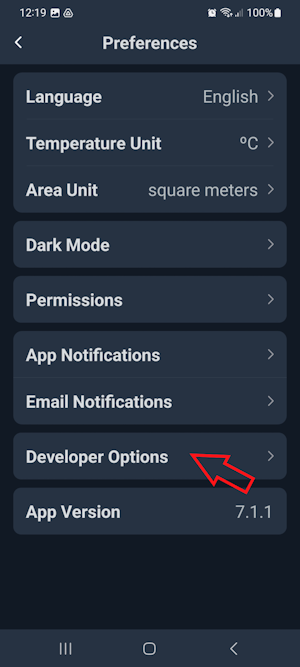
To get the above keys, open the SwitchBot application on your phone and tap the “Profile” item in the bottom menu. Here, select the “Preferences” submenu. Now tap on the “App Version” menu item 10 times, then a new menu item “DeveloperOptions” will appear.This menu item contains the token and secret key we need.
Now we need to get our project to start automatically when the system starts. For this we need another file.
sudo nano /etc/systemd/system/switchbot-client.serviceCopy the following few lines into the file. Don’t forget to enter the file path correctly!
[Unit]
Description="switchbot-client-service"
After=network.target network-online.target

[Service]
Restart=always
WorkingDirectory=/home/[USER]/switchbot/
ExecStart=/home/[USER]/switchbot/venv/bin/python3 /home/[USER]/switchbot/switchbot-client.py
ExecStop=deactivate

[Install]
WantedBy=multi-user.target
Set the permissions as follows.
sudo chmod 644 /etc/systemd/system/switchbot-client.serviceLet’s restart the systemctl background service.
sudo systemctl daemon-reloadEnable switchbot-client.service.
sudo systemctl enable inverter.serviceThus, switchbot-client.py will run every time the system is started and the read data will be sent to the mqtt server.
More SwitchBot tools

SwitchBot Curtain Smart Electric Motor
Wireless App or Automate Timer Control, Use SwitchBot Hub to be Compatible with Alexa, Google Home, HomePod, IFTTT…
advertising

SwitchBot Thermometer Hygrometer
Bluetooth Indoor Humidity Meter for Home, Temperature Sensor with App Control, Large LCD Display, Notification Alerts…
advertising

SwitchBot Remote One Touch Button
Compatible with SwitchBot Bot, Curtain Robot, Color Bulb, Plug Mini and Blind Tilt, Smart Home Easy to Control, Bluetooth Long Range 5.0
advertising

SwitchBot Blind Tilt Motorized Blinds
Smart Electric Blinds with Bluetooth Remote Control, Solar Powered, Light Sensing Control, Add SwitchBot Hub Mini to Make it Compatible with Alexa & Google Home
advertising
SwitchBot Smart Motion Door Sensor
Wireless Home Security System, PIR Motion Detector Alert, Add SwitchBot Hub to Make it Compatible with Alexa
advertising

Energy Monitor, Smart Home WiFi(2.4GHz) & Bluetooth Outlet Compatible with Alexa & Google Home, APP Remote Control & Timer Function
advertising
SwitchBot WiFi Thermometer Hygrometer
3 Pack with Hub Mini, IP65 Indoor Outdoor Thermometer Wireless, Humidity/Temperature/Dewpoint/VPD/Absolute Humidity Sensor with Smart Alerts, Works with Alexa
advertising

SwitchBot Smart LED Light Bulb
Color Changing Dimmable WiFi&Bluetooth Bulb Works with Alexa&Google, RGBCW Multicolor Warm White E26 10W 800lms Equals 60W Bulb, 2.4GHz Only, No Hub Required
advertising

SwitchBot Door Alarm Contact Sensor
Smart Home Security Wireless Window Alarm and Door Sensor, Add SwitchBot Hub to Make it Compatible with Alexa
advertising

Keyless Entry Door Lock, Smart Door Lock Front Door, Electronic Smart Deadbolt, Fits Your Existing Deadbolt in Minutes,Great for Airbnbs, Vacation Rentals and More
advertising

SwitchBot Smart Lock with Keypad
Bluetooth Electronic Deadbolt, Keyless Entry Door Lock, Smart Door Lock Front Door, Compatible with Wi-Fi Bridge
advertising

SwitchBot Baby Monitor Indoor Camera
360-degree 1080P Pan Tilt Smart WiFi(2.4G) Pet Camera for Home Security with Motion Detection, Night Vision, Two-Way Audio, Works with Alexa & Google Assistant
advertising