Program Overview
The program presented is not a complete, standalone application, but rather a stable and extensible foundation. It provides the essential services required for wireless network communication, remote data connectivity, and automatic switching between access points. Various target applications can later be built on this program structure by adding further functionality.
The aim of the development is to implement an ESP32-based Wi-Fi client capable of scanning available wireless networks in the background without blocking the execution of the main program. It then selects the access point that provides the better connection from among those using the same SSID. As a result, the device can maintain a more stable and reliable network connection even while moving.
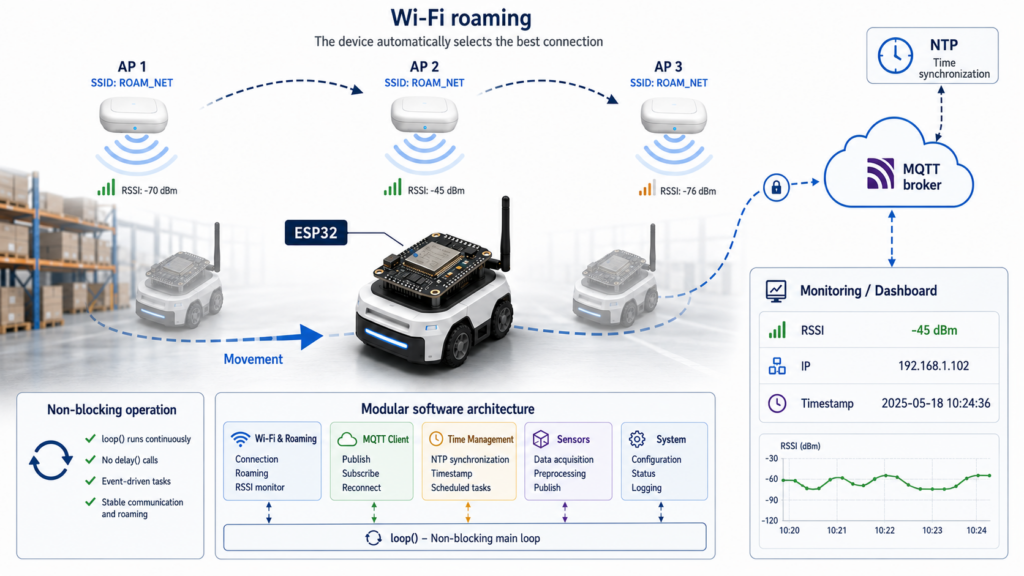
The program manages the ESP32’s Wi-Fi connection, continuously monitors its status, and implements MQTT-based communication. It also includes the basic logic for automatic switching between access points, known as roaming. During the decision-making process, it considers the measured signal strength, its averaged value, the configured hysteresis, and the stability of the new access point.
A key objective during development was to create a reliable, clear, and easily extensible program structure. Accordingly, Wi-Fi connection management, network scanning, roaming, MQTT communication, and time synchronization are implemented in separate functions. This modular structure simplifies debugging and further development, while allowing future applications to reuse the existing core functionality with minimal modification.
The program’s timing is primarily based on the elapsed runtime returned by the millis() function. This makes it possible to avoid blocking delays, enabling the system to continuously monitor network connections and respond quickly to events.
Detailed Description of the Program
Libraries Used
Three libraries are required for the program to operate.
The WiFi.h library provides the ESP32’s wireless networking functions, including connecting to a network, scanning for available networks, and retrieving RSSI values.
The PubSubClient.h library is responsible for implementing MQTT communication. It enables the device to send and receive messages through an MQTT broker.
The time.h library enables internet-based time synchronization, which the program uses to determine the startup time.
#include <WiFi.h>
#include <PubSubClient.h>
#include "time.h"
Configuration and Global Variables
At the beginning of the program are the constants and global variables containing the basic settings required for network communication and program operation. This section defines the Wi-Fi network name (SSID) and password, the IP address and port number of the MQTT broker, and the MQTT topics through which the ESP32 communicates.
To use the program, these values must be configured according to the local network environment. The connection details of the desired Wi-Fi network must be provided, along with the MQTT broker’s IP address and the port number used for communication.
// Wi-Fi connection credentials
const char* ssid = "mySSID";
const char* password = "myPassword";

// MQTT server settings
const char* mqttServer = "192.168.1.2";
const uint16_t mqttPort = 1883;
A Wi-Fi client and an MQTT client object are then created. These objects are responsible for managing the network connection and MQTT communication.
The global variables also include the arrays required for RSSI averaging, status flags controlling the roaming decision process, timing variables, and flags storing the current connection state.
The program can be easily customized by changing a few constants.
The wifiScanFreq variable determines how often a new Wi-Fi network scan is started. Its value is specified in milliseconds.
// Network scan interval in milliseconds
unsigned long wifiScanFreq = 15000;  // 15 seconds
The rssiSampleCount constant specifies how many consecutive RSSI measurements are used to calculate the average signal strength. A larger value produces a more stable average, but responds more slowly to changes in signal strength.
// Number of samples used to calculate the average
const int rssiSampleCount = 3;
The requiredStableScans constant determines how many consecutive network scans the new access point must remain the best candidate before roaming is performed.
// The new AP must remain the best choice for at least
// this many consecutive scans
const int requiredStableScans = 2;
The rssiHysteresis constant specifies the minimum signal-strength difference required before the program switches to a new access point. A smaller value makes the system more sensitive to changes in signal strength, while a larger value causes it to remain connected to the current access point more consistently.
// The new AP may only be selected if its signal strength is
// at least this many dBm better than the current connection
const int rssiHysteresis = 12;  // 12 dBm
Event-Driven Wi-Fi Management
The program monitors the status of the Wi-Fi connection using an event-driven approach. Individual network events are handled by the WiFiEvent() callback function, which is automatically called by the ESP32 Wi-Fi library whenever the state of the network connection changes.
void WiFiEvent(WiFiEvent_t event, WiFiEventInfo_t info)
{
  switch(event)
  {
    // Successfully connected to the access point
    case ARDUINO_EVENT_WIFI_STA_CONNECTED:
      ....
      break;

    // The device has received an IP address and the connection is ready
    case ARDUINO_EVENT_WIFI_STA_GOT_IP:
      ....
      break;

    // The connection was lost; reset the status flags
    case ARDUINO_EVENT_WIFI_STA_DISCONNECTED:
      ....
      break;

    // No handling is required for other Wi-Fi events
    default:
      break;
  }
}
When the ESP32 successfully connects to an access point, the program reports this on the serial monitor. At this stage, the wireless connection has already been established, but the device is still waiting to receive an IP address.
// Successfully connected to the access point
case ARDUINO_EVENT_WIFI_STA_CONNECTED:
  if(debug)
  {
    Serial.println();
    Serial.print("Connected to the ");
    Serial.println(WiFi.SSID().c_str());
    Serial.println("Waiting for an IP address...");
  }
  break;
After receiving an IP address from the network, the program sets a connection status flag, stores the current BSSID, and displays the IP address, the current RSSI value, and the device hostname.
The stored BSSID is required during subsequent network scans. It enables the program to distinguish the currently used access point from other access points broadcasting the same SSID.
// The device has received an IP address and the connection is ready
case ARDUINO_EVENT_WIFI_STA_GOT_IP:
  wifiConnected = true;   // Set the connection status flag
  currentBssid = WiFi.BSSIDstr();

  if(debug)
  {
    Serial.println();
    Serial.println("IP address received!");
    Serial.print("IP: ");
    Serial.println(WiFi.localIP());
    Serial.print("BSSID: ");
    Serial.println(currentBssid);
    Serial.print("HostName: ");
    Serial.println(WiFi.getHostname());
    Serial.print("RSSI: ");
    Serial.println(WiFi.RSSI());
    Serial.println();
  }
  break;
If the Wi-Fi connection is lost, the program clears the connection status flag. It also resets the network-scanning state so that a new scan can be started after the next successful connection.
// The connection was lost; reset the status flags
case ARDUINO_EVENT_WIFI_STA_DISCONNECTED:
  wifiConnected = false;
  isScanning = false;
  break;
Connecting to the Network
The setupWifi() function does more than simply initialize Wi-Fi. It also ensures that the device starts from a clean state. It terminates any previous connection, configures the ESP32 in client or Station mode, resets the network-scanning state, and then attempts to connect to the specified wireless network.
void setupWifi()
{
  // Remove any previous Wi-Fi connection
  WiFi.disconnect(true);

  // Configure the ESP32 in client (Station) mode
  WiFi.mode(WIFI_STA);

  // Reset the network scan state
  isScanning = false;

  // Attempt to connect to the specified Wi-Fi network
  if(!connectToWifi(ssid, password, 0, NULL))
  {
    ...
  }
}
The actual connection process is performed by the connectToWifi() function. Its design allows the same section of code to handle both the initial connection and reconnection during roaming.
During the initial connection, it is sufficient to provide the Wi-Fi network name, or SSID, and its password. In this case, the ESP32 automatically selects an appropriate access point.
After a Wi-Fi scan, when the roaming conditions are met, the program already knows the BSSID and operating channel of the selected access point. It can therefore connect directly to that AP. This shortens the connection process because no additional network scan is required.
Placing the connection logic in a separate function makes it possible to use the same implementation for both the initial network connection and access-point switching during roaming, thereby avoiding code duplication.
bool connectToWifi(const char* targetSsid,
                   const char* targetPass,
                   int32_t channel,
                   const uint8_t* bssid)
{
  ....

  // If the target AP's BSSID is known, connect directly to it
  if(bssid != NULL)
  {
    WiFi.begin(targetSsid, targetPass, channel, bssid, true);
  }
  else
  {
    // Otherwise, allow the ESP32 to select an access point
    WiFi.begin(targetSsid, targetPass);
  }

  ....
}
After a successful connection, the function initializes the variables required for roaming. It restarts RSSI averaging, clears any previously selected roaming candidate, and resets the roaming state.
As a result, every new connection starts from a clean state, regardless of whether it is the initial connection or a switch between access points.
....

// Return false if the connection attempt was unsuccessful
if(!wifiConnected)
{
  return false;
}

// Restart RSSI averaging after a successful connection
averagedRssi = -100;
updateAveragedRssi();

// Clear data related to the previous roaming decision
candidateBssid = "";
candidateCount = 0;

// Indicate that the roaming operation has finished
isRoaming = false;

return true;
Non-Blocking Asynchronous Wi-Fi Scanning
Traditional Wi-Fi scanning methods can pause program execution for several seconds, which may cause data loss in an IoT device. Asynchronous Wi-Fi scanning allows the ESP32 to search for nearby wireless networks in the background without waiting idly for the scan to finish.
While the background scan is in progress, the main program can continue running without interruption.
The startAsynchronousScan() function starts this process, but only when the device is already connected to the network and no other scan is currently running.
void startAsynchronousScan()
{
  // Do not start a new scan if one is already running
  // or if there is no active Wi-Fi connection
  if(isScanning || !wifiConnected) return;

  // Update the signal strength of the current connection
  // in preparation for the roaming decision
  updateAveragedRssi();

  // Set the scan status flag
  isScanning = true;

  if(debug) Serial.println("Network scan started...");

  // Start an asynchronous network scan
  // Program execution continues while the scan is running
  WiFi.scanNetworks(true, true, false);
}
Intelligent Roaming Algorithm with Hysteresis
In real-world environments, Wi-Fi signal strength measurements, or RSSI values, are highly unstable. Walls, physical obstacles, and even the movement of the human body can cause temporary fluctuations.
The updateAveragedRssi() function applies a moving-average filter to the RSSI measurements. Instead of making a decision based on a single RSSI reading, the system uses the average of the three most recent measurements. This reduces the effect of short-term signal fluctuations and enables more stable roaming decisions.
void updateAveragedRssi()
{
  // Read the current Wi-Fi signal strength
  int8_t currentRssi = WiFi.RSSI();

  // On the first measurement, initialize every sample
  // with the current value so that the average is immediately usable
  if(averagedRssi == -100)
  {
    for(int i = 0; i < rssiSampleCount; i++)
    {
      rssiSamples[i] = currentRssi;
    }

    averagedRssi = currentRssi;
    return;
  }

  // Store the new measurement in the circular sample buffer
  rssiSamples[rssiSampleIndex] = currentRssi;

  // Determine the position of the next sample
  rssiSampleIndex = (rssiSampleIndex + 1) % rssiSampleCount;

  // Sum the stored RSSI values
  int32_t sum = 0;

  for(int i = 0; i < rssiSampleCount; i++)
  {
    sum += rssiSamples[i];
  }

  // Calculate the average RSSI value
  averagedRssi = sum / rssiSampleCount;
}
Hysteresis is a safety margin that prevents the ESP32 from continuously switching back and forth between two Wi-Fi access points when their signal strengths are nearly identical. This repeated switching is known as the ping-pong effect. The hysteresis value currently used by the program is 12 dBm.
Without hysteresis, suppose access point A has a signal strength of −70 dBm, while access point B temporarily rises to −69 dBm. The ESP32 could immediately disconnect from A and switch to B. One second later, if B drops to −71 dBm, the device might switch back to A. This would cause repeated connection interruptions.
With a 12 dBm hysteresis margin, the ESP32 starts roaming only when the signal strength of a newly detected access point is at least 12 dBm stronger than the averaged signal strength of the current connection.
Hysteresis alone is not sufficient to ensure that the new access point provides a consistently better connection. The program therefore also applies time-based confirmation, or debouncing.
With the current configuration, the same access point must remain the best candidate during two consecutive network scans. At a scan interval of 15 seconds, this corresponds to approximately 30 seconds of confirmation time.
void checkScanResults()
{
  ....

  // Consider roaming only if the signal strength of the new AP
  // exceeds the hysteresis threshold
  if(bestNetworkIndex != -1 &&
     bestScanRssi > averagedRssi + rssiHysteresis)
  {
    // Check whether the same AP remains the best choice
    // during multiple consecutive scans
    if(bestScanBssid == candidateBssid)
    {
      candidateCount++;
    }
    else
    {
      candidateBssid = bestScanBssid;
      candidateCount = 1;
    }

    ....
  }
}
When all conditions are satisfied, roaming begins. The ESP32 terminates the existing connection, disconnects the MQTT client, and then connects directly to the selected access point.
Disconnecting MQTT is necessary because the underlying TCP connection becomes invalid when the Wi-Fi connection is interrupted. After the ESP32 connects to the new access point, the MQTT connection is automatically re-established.
....

// If the roaming conditions are satisfied,
// switch to the new access point
if(candidateCount >= requiredStableScans)
{
  if(debug)
  {
    Serial.printf(
      "Roaming from %s to %s\n",
      currentBssid.c_str(),
      candidateBssid.c_str()
    );

    Serial.println();
  }

  // Indicate that a roaming operation is in progress
  isRoaming = true;

  int32_t channel = WiFi.channel(bestNetworkIndex);
  const uint8_t* bssid = WiFi.BSSID(bestNetworkIndex);

  // Disconnect MQTT before roaming
  if(mqttClient.connected())
  {
    mqttClient.disconnect();
  }

  // Disconnect from the current Wi-Fi access point
  WiFi.disconnect();

  // Delete the scan results and release memory
  WiFi.scanDelete();

  isScanning = false;

  // Connect to the selected access point
  connectToWifi(ssid, password, channel, bssid);

  return;
}

....
After every scanning cycle, the program releases the memory used by the scan results by calling WiFi.scanDelete(). It then clears the scanning status flag to indicate that the network scan has finished.
This completes the current scanning cycle. The program continues operating through the existing connection until the next scheduled network scan.
// Delete the scan results and release memory
WiFi.scanDelete();

// Indicate that the scanning process has finished
isScanning = false;

....
}
MQTT Connection and Remote Control
During MQTT communication, an important requirement is that Wi-Fi scanning and switching between access points, or roaming, must not cause a prolonged loss of connectivity. If the MQTT connection is interrupted during roaming, the program automatically re-establishes it, restoring communication without human intervention.
The reconnectMqtt() function is responsible for rebuilding the MQTT connection. Unlike traditional example programs, it does not use a blocking while loop. Therefore, if the MQTT broker is temporarily unavailable, the program does not stop and wait. Instead, it continues executing the loop() cycle.
This ensures that Wi-Fi connection management, network scanning, and roaming can continue operating without interruption.
void reconnectMqtt()
{
  // Attempt to establish an MQTT connection only when Wi-Fi is active,
  // the MQTT client is disconnected, and no network scan is in progress
  if(wifiConnected && !mqttClient.connected() && !isScanning)
  {
    if(debug) Serial.println("Connecting to the MQTT server...");

    // Connect to the MQTT broker
    if(mqttClient.connect(mqttClientId))
    {
      if(debug)
      {
        Serial.println("MQTT server connected!");
        Serial.println();
      }

      ....
    }
  }
}
The program subscribes to the debug topic, allowing serial-port debugging and logging to be enabled or disabled remotely with a single MQTT message. When enabled, the program writes detailed information to the serial monitor, which significantly simplifies system monitoring and troubleshooting.
Additional topics can also be subscribed to here as the program is extended.
....

// Subscribe to the required topics
mqttClient.subscribe(debugTopic);

// Subscribe to additional topics...

}
else
{
  if(debug)
  {
    Serial.print("Failed to connect to the MQTT server. | rc=");
    Serial.println(mqttClient.state());
    Serial.println();
  }
}
Incoming MQTT messages are processed by the mqttCallback() function. This function is called automatically whenever the MQTT broker forwards a new message on one of the subscribed topics.
In the current implementation, the callback function provides remote control of the debugging mode. By sending the value true or false to the debug topic, serial logging can be enabled or disabled while the program is running. This eliminates the need to recompile or restart the program.
void mqttCallback(char* topic, byte* payload, unsigned int length)
{
  // Convert the incoming topic and payload to strings
  String strTopic = String(topic);
  String strPayload = String((char*)payload, length);

  // Control debugging mode remotely through an MQTT message
  if(strTopic == debugTopic)
  {
    if(strPayload == "true")
    {
      debug = true;
      Serial.println("Debug enabled!");
      Serial.println();
    }
    else if(strPayload == "false")
    {
      Serial.println("Debug disabled!");
      Serial.println();
      debug = false;
    }
  }

  // Handle additional MQTT messages...
}
The callback function is structured so that support for additional MQTT commands can be added easily. This makes it straightforward to extend the system with new functions.
During operation, the ESP32 continuously publishes important status information, such as its current IP address and averaged RSSI value. These values are sent to dedicated MQTT topics, allowing an external application or monitoring system to track the device’s status continuously.
Publishing takes place at the end of the checkScanResults() function. The advantage of this approach is that, after roaming, both the Wi-Fi connection and MQTT communication have already been restored. Therefore, the published data always reflects the current network state.
void checkScanResults()
{
  ....

  // Publish the current status through MQTT
  if(mqttClient.connected())
  {
    mqttClient.publish(
      rssiTopic,
      String(averagedRssi).c_str()
    );

    mqttClient.publish(
      ipTopic,
      WiFi.localIP().toString().c_str()
    );

    if(debug)
    {
      Serial.print("Averaged RSSI: ");
      Serial.println(averagedRssi);

      Serial.print("IP: ");
      Serial.println(WiFi.localIP());
      Serial.println();
    }
  }
}
Startup Timestamp with Time-Zone Support
After the first successful Wi-Fi and MQTT connection, the device retrieves the current date and time from the pool.ntp.org NTP server. It then applies the Central European time zone, CET/CEST, which automatically handles transitions between standard time and daylight saving time.
Based on the retrieved time, the program creates a formatted timestamp and sends it to the broker as an MQTT message. This allows the server to record the exact startup time of the device, simplifying system monitoring and later fault analysis.
void sendLocalTime()
{
  // Retrieve the current time from the NTP server
  if(!getLocalTime(&timeinfo))
  {
    ....
  }

  // Format the timestamp
  strftime(
    Msg_Timestamp,
    sizeof(Msg_Timestamp),
    "%Y.%m.%d-%H:%M:%S",
    &timeinfo
  );

  ....

  // Publish the timestamp as an MQTT message
  mqttClient.publish(startTimeTopic, formattedTime);
}
Before NTP-based time synchronization can be used, the selected time zone and NTP server must be configured. This is done in the setup() function by calling configTzTime().
void setup()
{
  ....

  // Configure time synchronization using an NTP server
  configTzTime(timeZone, ntpServer);
}
The startup timestamp is sent only once, after the first successful connection. The program ensures this through a status flag, preventing the timestamp from being published again after later reconnections or roaming operations.
void loop()
{
  ....

  mqttClient.loop();

  // Send the startup timestamp only once
  if(first)
  {
    sendLocalTime();
    first = false;
  }

  ....
}
System Initialization
The setup() function runs once when the program starts and performs the initialization tasks required for system operation. It configures serial communication, registers the Wi-Fi and MQTT event-handling functions, initializes the network connection, and configures NTP-based time synchronization.
void setup()
{
  // Initialize serial communication
  Serial.begin(115200);

  // Brief delay to allow the system to stabilize
  delay(2000);

  // Register the Wi-Fi event handler
  WiFi.onEvent(WiFiEvent);

  // Initialize the Wi-Fi connection
  setupWifi();

  // Configure the MQTT server address and port
  mqttClient.setServer(mqttServer, mqttPort);

  // Register the MQTT callback function
  mqttClient.setCallback(mqttCallback);

  // Configure time synchronization using an NTP server
  configTzTime(timeZone, ntpServer);
}
After this initialization process, all required services are ready for the main program to operate.
Main Program Operation
The loop() function is the main control cycle of the program and runs continuously while the system is operating. Its responsibilities include monitoring the Wi-Fi and MQTT connections, scheduling network scans, controlling the roaming process, and executing other timed tasks.
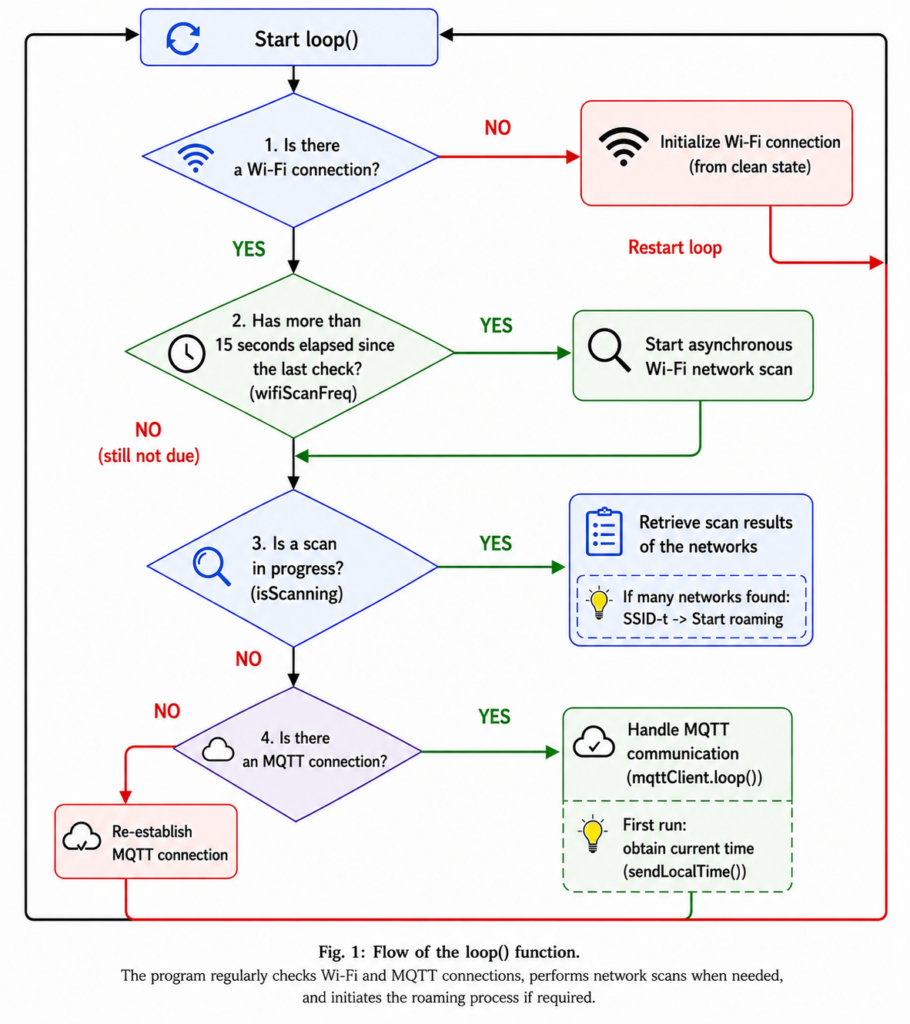
The main program does not use blocking waits caused by the delay() function. This allows the different tasks to run continuously and independently of one another. Timing is implemented using the elapsed runtime returned by the millis() function, enabling non-blocking operation and rapid system response to events.
First, the program checks whether the ESP32 has an active Wi-Fi connection. If the connection has been lost and the disconnection was not caused by a roaming operation, the program automatically restarts the connection process.
When the Wi-Fi connection is active, the program starts an asynchronous network scan at predefined intervals. After the scan is complete, it evaluates the results and, when necessary, switches between access points through the roaming process.
At the same time, it continuously monitors the MQTT connection. When required, it automatically reconnects to the broker, processes incoming MQTT messages, and sends the startup timestamp after the first successful connection.
void loop()
{
  // Retrieve the current runtime
  currentMillis = millis();

  // If there is no Wi-Fi connection and the disconnection
  // was not caused by roaming, restart the connection process
  if(!wifiConnected && !isRoaming)
  {
    setupWifi();
    return;
  }
  else if(wifiConnected)
  {
    // Start a new network scan at predefined intervals
    if(currentMillis - prevScanMillis > wifiScanFreq)
    {
      prevScanMillis = currentMillis;
      startAsynchronousScan();
    }

    // Evaluate the network scan results
    if(isScanning)
    {
      checkScanResults();
    }

    // Restore the MQTT connection if necessary
    if(!mqttClient.connected())
    {
      reconnectMqtt();
    }
    else
    {
      // Maintain MQTT communication
      mqttClient.loop();

      // Send the startup timestamp only once
      if(first)
      {
        sendLocalTime();
        first = false;
      }

      // Additional MQTT messages can be sent here...
    }
  }
}
Attachment
Complete commented source code:
#include <WiFi.h>
#include <PubSubClient.h>
#include "time.h"

// Wi-Fi connection credentials
const char* ssid = "mySSID";
const char* password = "myPassword";

// MQTT server settings
const char* mqttServer = "192.168.1.2";
const uint16_t mqttPort = 1883;
const char* mqttClientId = "ESP32_Mesh_Node";

// MQTT topics
const char* rssiTopic = "esp32/RSSI";
const char* debugTopic = "esp32/DebugEnabled";
const char* ipTopic = "esp32/IP";
const char* newstartTopic = "esp32/Newstart";

// Create TCP and MQTT client objects
WiFiClient espClient;
PubSubClient mqttClient(espClient);

// Enable debugging mode
bool debug = true;

// Variables used for timing
unsigned long currentMillis = 0;
unsigned long wifiScanFreq = 15000;  // Network scan interval: 15 seconds
unsigned long prevScanMillis = 0;

// Current access point information
String currentBssid;
int8_t rssi;
bool isScanning = false;  // Indicates whether a network scan is in progress

// Variables used for RSSI moving-average calculation
const int rssiSampleCount = 3;
int8_t rssiSamples[rssiSampleCount] = {0};
int rssiSampleIndex = 0;
int8_t averagedRssi = -100;

// Variables used for the roaming decision
String candidateBssid = "";
int candidateCount = 0;

// The new AP must remain the best choice during at least
// two consecutive network scans
const int requiredStableScans = 2;

// The new AP may only be selected if its signal strength is
// at least 12 dBm better than the current connection
const int rssiHysteresis = 12;

// NTP server and time-zone settings
const char* ntpServer = "pool.ntp.org";
const char* timeZone = "CET-1CEST,M3.5.0,M10.5.0/3";

// Send the startup timestamp only once
bool first = true;

// Status flags
bool wifiConnected = false;
bool isRoaming = false;


/*****************************************************************************/
// Wi-Fi event-handler function.
//
// The system calls this function automatically whenever the state of the
// Wi-Fi connection changes, for example when the device connects, receives
// an IP address, or loses its connection.
//
// Depending on the event type, the function updates the program state and,
// when debugging is enabled, displays diagnostic information.
/*****************************************************************************/
void WiFiEvent(WiFiEvent_t event, WiFiEventInfo_t info)
{
  switch(event)
  {
    // Successfully connected to the access point
    case ARDUINO_EVENT_WIFI_STA_CONNECTED:
      if(debug)
      {
        Serial.println();
        Serial.print("Connected to ");
        Serial.println(WiFi.SSID().c_str());
        Serial.println("Waiting for an IP address...");
      }
      break;

    // The device has received an IP address and the connection is ready
    case ARDUINO_EVENT_WIFI_STA_GOT_IP:
      wifiConnected = true;
      currentBssid = WiFi.BSSIDstr();

      if(debug)
      {
        Serial.println();
        Serial.println("IP address received!");

        Serial.print("IP: ");
        Serial.println(WiFi.localIP());

        Serial.print("BSSID: ");
        Serial.println(currentBssid);

        Serial.print("Hostname: ");
        Serial.println(WiFi.getHostname());

        Serial.print("RSSI: ");
        Serial.println(WiFi.RSSI());

        Serial.println();
      }
      break;

    // The connection was lost; reset the status flags
    case ARDUINO_EVENT_WIFI_STA_DISCONNECTED:
      wifiConnected = false;
      isScanning = false;
      break;

    // No handling is required for other Wi-Fi events
    default:
      break;
  }
}


/*****************************************************************************/
// Connects to the specified Wi-Fi network.
//
// During a normal connection, only the SSID and password are required.
// During roaming, a specific BSSID and channel may also be provided,
// allowing the ESP32 to switch to the selected AP more quickly.
/*****************************************************************************/
bool connectToWifi(
  const char* targetSsid,
  const char* targetPass,
  int32_t channel,
  const uint8_t* bssid
)
{
  // Reset the connection status
  wifiConnected = false;

  if(debug)
  {
    Serial.print("Connecting to Wi-Fi...");
  }

  // If the target AP's BSSID is known, connect directly to it
  if(bssid != NULL)
  {
    WiFi.begin(targetSsid, targetPass, channel, bssid, true);
  }
  else
  {
    // Otherwise, allow the ESP32 to select an access point
    WiFi.begin(targetSsid, targetPass);
  }

  // Wait for a successful connection for up to 15 seconds
  int attempts = 0;

  while(!wifiConnected && attempts < 30)
  {
    delay(500);
    attempts++;
  }

  // Return false if the connection attempt was unsuccessful
  if(!wifiConnected)
  {
    return false;
  }

  // Restart RSSI averaging after a successful connection
  averagedRssi = -100;
  updateAveragedRssi();

  // Clear data related to the previous roaming decision
  candidateBssid = "";
  candidateCount = 0;

  // Indicate that the roaming operation has finished
  isRoaming = false;

  return true;
}


/*****************************************************************************/
// Initializes the Wi-Fi connection.
//
// The function removes any previous connection, configures the ESP32 in
// client or Station mode, and attempts to connect to the specified wireless
// network.
/*****************************************************************************/
void setupWifi()
{
  // Remove any previous Wi-Fi connection
  WiFi.disconnect(true);

  // Configure the ESP32 in client or Station mode
  WiFi.mode(WIFI_STA);

  // Reset the network-scanning state
  isScanning = false;

  // Attempt to connect to the specified Wi-Fi network
  if(!connectToWifi(ssid, password, 0, NULL))
  {
    if(debug)
    {
      Serial.println();
      Serial.println(
        "Initial connection failed. Waiting for event retries."
      );
    }
  }
}


/*****************************************************************************/
// Starts an asynchronous Wi-Fi network scan.
//
// The function checks whether a new scan can be started and then begins
// searching for nearby networks in the background. The scan does not block
// program execution, allowing other tasks, such as MQTT communication, to
// continue operating.
/*****************************************************************************/
void startAsynchronousScan()
{
  // Do not start a new scan if one is already running
  // or if there is no active Wi-Fi connection
  if(isScanning || !wifiConnected)
  {
    return;
  }

  // Update the signal strength of the current connection
  // in preparation for the roaming decision
  updateAveragedRssi();

  // Set the scanning status flag
  isScanning = true;

  if(debug)
  {
    Serial.println("Network scan started...");
  }

  // Start an asynchronous network scan
  // Program execution continues while the scan is running
  WiFi.scanNetworks(true, true, false);
}


/*****************************************************************************/
// Updates and averages the current RSSI value.
//
// Because wireless signal strength naturally fluctuates, the program uses
// an average calculated from multiple measurements when making roaming
// decisions. This reduces the effect of temporary signal variations.
/*****************************************************************************/
void updateAveragedRssi()
{
  // Read the current Wi-Fi signal strength
  int8_t currentRssi = WiFi.RSSI();

  // On the first measurement, initialize every sample with the current value
  // so that the calculated average is immediately usable
  if(averagedRssi == -100)
  {
    for(int i = 0; i < rssiSampleCount; i++)
    {
      rssiSamples[i] = currentRssi;
    }

    averagedRssi = currentRssi;
    return;
  }

  // Store the new measurement in the circular sample buffer
  rssiSamples[rssiSampleIndex] = currentRssi;

  // Determine the location of the next sample
  rssiSampleIndex = (rssiSampleIndex + 1) % rssiSampleCount;

  // Sum the stored RSSI values
  int32_t sum = 0;

  for(int i = 0; i < rssiSampleCount; i++)
  {
    sum += rssiSamples[i];
  }

  // Calculate the average RSSI value
  averagedRssi = sum / rssiSampleCount;
}


/*****************************************************************************/
// Evaluates the network scan results.
//
// The function selects the most suitable access point and determines whether
// roaming should be performed based on hysteresis and stability conditions.
/*****************************************************************************/
void checkScanResults()
{
  // Check whether the network scan has finished
  int16_t networks = WiFi.scanComplete();

  if(networks == WIFI_SCAN_RUNNING)
  {
    return;
  }

  // Reset the scanning state if the scan failed
  if(networks == WIFI_SCAN_FAILED)
  {
    if(debug)
    {
      Serial.println("Network scan failed!");
      Serial.println();
    }

    isScanning = false;
    return;
  }

  if(networks > 0)
  {
    // Store information about the best AP found during the scan
    int bestNetworkIndex = -1;
    int8_t bestScanRssi = -100;
    String bestScanBssid = "";

    if(debug)
    {
      Serial.print("Network scan completed. ");
      Serial.print(networks);
      Serial.println(" networks found:");
    }

    // Select the strongest access point with the same SSID
    // that is not currently being used
    for(int i = 0; i < networks; i++)
    {
      if(WiFi.SSID(i) == ssid)
      {
        int8_t scanRssi = WiFi.RSSI(i);

        if(
          scanRssi > bestScanRssi &&
          WiFi.BSSIDstr(i) != currentBssid
        )
        {
          bestScanRssi = scanRssi;
          bestScanBssid = WiFi.BSSIDstr(i);
          bestNetworkIndex = i;
        }
      }

      if(debug)
      {
        Serial.print(i + 1);

        Serial.print(". SSID: ");
        Serial.print(WiFi.SSID(i));

        Serial.print(" | RSSI: ");
        Serial.print(WiFi.RSSI(i));

        Serial.print(" | BSSID: ");
        Serial.println(WiFi.BSSIDstr(i));
      }
    }

    if(debug)
    {
      Serial.println();
    }

    // Consider roaming only if the signal strength of the new AP
    // exceeds the hysteresis threshold
    if(
      bestNetworkIndex != -1 &&
      bestScanRssi > averagedRssi + rssiHysteresis
    )
    {
      // Check whether the same AP remains the best choice
      // during multiple consecutive scans
      if(bestScanBssid == candidateBssid)
      {
        candidateCount++;
      }
      else
      {
        candidateBssid = bestScanBssid;
        candidateCount = 1;
      }

      // Switch to the new access point when all roaming
      // conditions have been satisfied
      if(candidateCount >= requiredStableScans)
      {
        if(debug)
        {
          Serial.printf(
            "Roaming from %s to %s\n",
            currentBssid.c_str(),
            candidateBssid.c_str()
          );

          Serial.println();
        }

        // Indicate that a roaming operation is in progress
        isRoaming = true;

        int32_t channel = WiFi.channel(bestNetworkIndex);
        const uint8_t* bssid = WiFi.BSSID(bestNetworkIndex);

        // Disconnect MQTT before roaming
        if(mqttClient.connected())
        {
          mqttClient.disconnect();
        }

        // Disconnect from the current Wi-Fi access point
        WiFi.disconnect();

        // Delete the scan results and release memory
        WiFi.scanDelete();

        isScanning = false;

        // Connect to the selected access point
        connectToWifi(ssid, password, channel, bssid);
        return;
      }
    }
    else
    {
      // Clear the previous candidate if there is no suitable
      // roaming destination
      candidateBssid = "";
      candidateCount = 0;
    }
  }

  // Delete the scan results and release memory
  WiFi.scanDelete();

  // Indicate that the scan has finished
  isScanning = false;

  // Publish the current status through MQTT
  if(mqttClient.connected())
  {
    mqttClient.publish(
      rssiTopic,
      String(averagedRssi).c_str()
    );

    mqttClient.publish(
      ipTopic,
      WiFi.localIP().toString().c_str()
    );

    if(debug)
    {
      Serial.print("Averaged RSSI: ");
      Serial.println(averagedRssi);

      Serial.print("IP: ");
      Serial.println(WiFi.localIP());

      Serial.println();
    }
  }
}


/*****************************************************************************/
// Retrieves the current date and time from an NTP server.
//
// After successful time synchronization, the function formats the timestamp
// and publishes it through MQTT so that the device startup time can be logged.
/*****************************************************************************/
void sendLocalTime()
{
  char Msg_Timestamp[20];
  struct tm timeinfo;

  // Retrieve the current time from the NTP server
  if(!getLocalTime(&timeinfo))
  {
    if(debug)
    {
      Serial.println(
        "Unable to retrieve the time from the NTP server!"
      );

      Serial.println();
    }

    return;
  }
  else
  {
    if(debug)
    {
      Serial.println("Time retrieved!");
    }
  }

  // Format the timestamp
  strftime(
    Msg_Timestamp,
    sizeof(Msg_Timestamp),
    "%Y.%m.%d-%H:%M:%S",
    &timeinfo
  );

  if(debug)
  {
    Serial.println(Msg_Timestamp);
    Serial.println();
  }

  // Publish the timestamp as an MQTT message
  mqttClient.publish(newstartTopic, Msg_Timestamp);
}


/*****************************************************************************/
// MQTT callback function.
//
// The MQTT client calls this function automatically whenever a new message
// arrives. The function performs the required operation according to the
// received topic and payload.
//
// The current implementation provides remote control of debugging mode.
// Additional MQTT commands can be handled here later.
/*****************************************************************************/
void mqttCallback(
  char* topic,
  byte* payload,
  unsigned int length
)
{
  // Convert the received topic and payload to strings
  String strTopic = String(topic);
  String strPayload = String((char*)payload, length);

  // Control debugging mode remotely using an MQTT message
  if(strTopic == debugTopic)
  {
    if(strPayload == "true")
    {
      debug = true;

      Serial.println("Debug enabled!");
      Serial.println();
    }
    else if(strPayload == "false")
    {
      Serial.println("Debug disabled!");
      Serial.println();

      debug = false;
    }
  }

  // Handle additional MQTT messages here...
}


/*****************************************************************************/
// Re-establishes the MQTT connection.
//
// If the Wi-Fi connection is active but the MQTT connection has been lost,
// the function attempts to reconnect to the broker. After a successful
// connection, it subscribes to the required MQTT topics.
/*****************************************************************************/
void reconnectMqtt()
{
  // Attempt to establish an MQTT connection only when Wi-Fi is active,
  // the MQTT client is disconnected, and no network scan is in progress
  if(
    wifiConnected &&
    !mqttClient.connected() &&
    !isScanning
  )
  {
    if(debug)
    {
      Serial.println("Connecting to the MQTT server...");
    }

    // Connect to the MQTT broker
    if(mqttClient.connect(mqttClientId))
    {
      if(debug)
      {
        Serial.println("MQTT server connected!");
        Serial.println();
      }

      // Subscribe to the required topics
      mqttClient.subscribe(debugTopic);
    }
    else
    {
      if(debug)
      {
        Serial.print(
          "Failed to connect to the MQTT server. | rc="
        );

        Serial.println(mqttClient.state());
        Serial.println();
      }
    }
  }
}


/*****************************************************************************/
// Program initialization
/*****************************************************************************/
void setup()
{
  // Initialize serial communication
  Serial.begin(115200);

  // Brief delay to allow the system to stabilize
  delay(2000);

  // Register the Wi-Fi event handler
  WiFi.onEvent(WiFiEvent);

  // Initialize the Wi-Fi connection
  setupWifi();

  // Configure the MQTT server address and port
  mqttClient.setServer(mqttServer, mqttPort);

  // Register the MQTT callback function
  mqttClient.setCallback(mqttCallback);

  // Configure time synchronization using an NTP server
  configTzTime(timeZone, ntpServer);
}


/*****************************************************************************/
// Main program loop.
//
// The function continuously monitors the Wi-Fi and MQTT connection states,
// starts network scans at predefined intervals, evaluates scan results, and
// maintains the roaming and MQTT communication processes.
/*****************************************************************************/
void loop()
{
  // Retrieve the current runtime
  currentMillis = millis();

  // If there is no Wi-Fi connection and the disconnection
  // was not caused by roaming, restart the connection process
  if(!wifiConnected && !isRoaming)
  {
    setupWifi();
    return;
  }
  else if(wifiConnected)
  {
    // Start a new network scan at predefined intervals
    if(currentMillis - prevScanMillis > wifiScanFreq)
    {
      prevScanMillis = currentMillis;
      startAsynchronousScan();
    }

    // Evaluate the network scan results
    if(isScanning)
    {
      checkScanResults();
    }

    // Restore the MQTT connection if necessary
    if(!mqttClient.connected())
    {
      reconnectMqtt();
    }
    else
    {
      // Maintain MQTT communication
      mqttClient.loop();

      // Send the startup timestamp only once
      if(first)
      {
        sendLocalTime();
        first = false;
      }

      // Additional MQTT messages can be sent here...
    }
  }
}
```